Home & recommended next step
See your exam countdown, study target, recorded progress and a useful next practice action in one place.
A useful way to try it
Set your exam date, then open the suggested Client Needs category.
THE COMPLETE RN CLARITY GUIDE
From your first NCLEX practice question to the conversations you will have on the nursing floor. Find what you need, see what it does and know where to go.
Student study tools · free public learning · teaching resources · partner programs
Questions · NGN · exam practice
Review · planning · private feedback
Bedside lessons · scenarios · language
SEE IT BEFORE YOU CHOOSE
Try a real public question and a complete NGN case. See a bedside diagram in action, or watch a guided tour of the student workspace.
Explore the interactive lesson Every feature below includes its location and access label.
FIVE AUDIENCES. ONE DIRECTORY.
01 · Your private study space
Build a study routine, practise decisions, understand your results and return to the concepts that need attention.
Sign in for personal study history. Free accounts have selected previews; full collections and individual feature limits depend on your plan.
See your exam countdown, study target, recorded progress and a useful next practice action in one place.
Set your exam date, then open the suggested Client Needs category.
Get help finding the study areas, then watch demonstrations of the dashboard and learning tools.
Watch the dashboard tour before beginning your first session.
Browse NCLEX-RN practice by category, topic or body system. Use the available filters to choose a focused study set.
Choose a weak topic rather than repeating a familiar one.
Build a practice session using the available category, difficulty and question-selection controls. Review your saved attempt afterwards.
Complete a short mixed set when you have a smaller study window.
Use a hint when offered, then read the plain-English explanation after answering. Available explanation fields depend on the item.
Read the patient cues first; use the hint to check your reasoning.
Understand why an answer fits and why plausible alternatives do not. Sources, visuals, traps and takeaways appear where available.
Compare two tempting choices using the decisive clinical cue.
Ask a focused follow-up about an explanation, or request simpler wording. AI answers need checking against reliable clinical sources.
Ask: “Which cue makes this option the priority?”
Explore a nursing concept or ask for a mini-lesson in a dedicated study conversation. Usage allowances depend on your account and plan.
Ask for a plain-language explanation of preload and afterload.
Follow unfolding patient information through six clinical-judgment tasks, then review the answers, reasoning and available saved progress.
Notice how new observations change your priorities.
Practise individual NGN-style decisions without completing a whole case. Search the collection and review supported item formats and scoring.
Use a focused item to revisit one clinical-judgment skill.
Save and revisit Question Bank questions, NGN cases and standalone items from their separate bookmark tabs.
Keep a difficult case available for your next review session.
Return to missed concepts using scheduled review prompts. Review the reasoning before starting another related practice set.
Explain why your earlier choice was wrong, then try again.
Use recall cards and the available review scheduling to revisit high-yield learning points.
Try to recall the answer before turning the card.
Take a short baseline check across exam categories to help choose your starting study priorities.
Use the result to choose your first focused practice topic.
Complete a scored assessment and inspect your observed category performance. A practice result is feedback, not a pass prediction.
Compare category patterns across completed assessments.
Explore system-focused checks and drills, with available selection controls for unseen or missed questions.
Review a body system, then practise its less familiar concepts.
Fit a shorter timed, fixed-form exam session into your day. The start screen shows its item count and conditions.
Choose a shorter rehearsal when a full mock will not fit.
Rehearse a longer timed exam, then review the submitted result and rationales. Full mocks do not adapt question difficulty to your answers.
Practise pacing and return to explanations after submission.
Practise with RN Clarity’s adaptive selection in an 85–150-item format with a five-hour limit. It is educational practice, not official NCLEX calibration.
Rehearse sustained decision-making and use the feedback to plan review.
Return to supported saved practice and exam sessions, inspect results and revisit completed answers. Recovery follows the saved state and exam rules.
Open a previous mock to see which items need another explanation.
Explore recorded accuracy, study activity and category results from the Progress workspace. Small samples provide limited evidence.
Read accuracy alongside how many questions you have attempted.
Look at your recorded study patterns and earlier tests to plan a more consistent routine.
Find a realistic study rhythm using your own completed activity.
Identify categories and topics that need more attention, then connect the pattern with focused practice.
Choose one weaker area for the next set rather than practising everything.
Reflect on recurring errors using recorded answers and selected mistake reasons where available. It suggests review targets, not a diagnosis of your learning.
Separate a missed knowledge point from a misread question.
See which exam categories you have practised and how much evidence supports the displayed progress.
Notice a lightly practised category even when its early score is high.
Organise study time around your exam timing and learning priorities. Follow the available daily plan and completion controls.
Choose a manageable daily task, complete it and review the next step.
See recorded learning milestones and study consistency. Use them as motivation alongside your actual learning progress.
Celebrate returning to study while continuing to review difficult topics.
Find the reference collections and a selection of currently available facts and stories in the Library.
Start a short study session with one nursing fact.
Study medication purposes, mechanisms, safety considerations, monitoring and patient teaching on the available cards.
Connect a medicine’s intended effect with the observations a nurse checks.
Read concise nursing learning points with bedside relevance and available source references.
Turn one fact into a recall question for tomorrow.
Explore the human side of care. Read each story’s historical, fictional or teaching-context label.
Discuss the care value illustrated by the story.
Use short health and science curiosities as a lighter entry into a learning session.
Follow an interesting fact into its supporting context.
Explore anatomy diagrams and clinical explainers to connect a mechanism with the concept you are studying.
Look at the diagram while explaining the process aloud.
Move through structured learning decks and use the available explanations and visual material for topic review.
Review one topic in a presentation before returning to practice.
Use app search, the sidebar and section links to find study areas and resources. The dashboard tour helps explain the layout.
Search for a feature when you are unsure which menu contains it.
Read in-app notifications and manage optional study reminders. Push delivery needs permission and a supported device; it is not guaranteed.
Choose a reminder time that fits your study routine.
Choose available partial study translations, appearance and accessibility options. Assessment questions and choices remain English.
Use a familiar-language explanation, then check the English clinical term.
Add RN Clarity to a supported device’s home screen for a convenient app entry point. Online study functions still need a connection.
Open your study space from your phone’s home screen.
Manage the available account, security, notification and subscription settings, including account-deletion controls.
Check your access and billing details from the Subscription tab.
Open support requests, read replies and report unclear or potentially incorrect question content using the available reporting controls.
Include the affected item and a clear description of the issue.
Find the referral-program information and your available account referral tools. Eligibility and current program rules apply.
Read the rules before recommending RN Clarity to a friend.
02 · Open learning, wherever you are
Explore nursing knowledge, try the learning experience and prepare for workplace communication without first buying a plan.
Public resources are separate from your private dashboard. Books are separate purchases; calculators and lessons are educational support.
Try a public question explanation and a complete six-step case, then see how practice connects to private analytics.
Inspect the reasoning before choosing a membership.
Explore the seven detailed feature guides, the sourced product comparison and the content-quality information.
Compare learning formats and access using the linked official sources.
Follow foundations, body systems, risk scenarios and workplace language as a connected learning pathway.
Connect a concept from exam practice with a bedside teaching example.
Explore medication safety, physiology and clinical reasoning, population health, and diagnostics using the available lesson formats.
Choose a foundation before exploring its related system lesson.
Study clinical subjects through visual lessons, presentations, infographics, explanations and sources.
Connect respiratory assessment with the related clinical case.
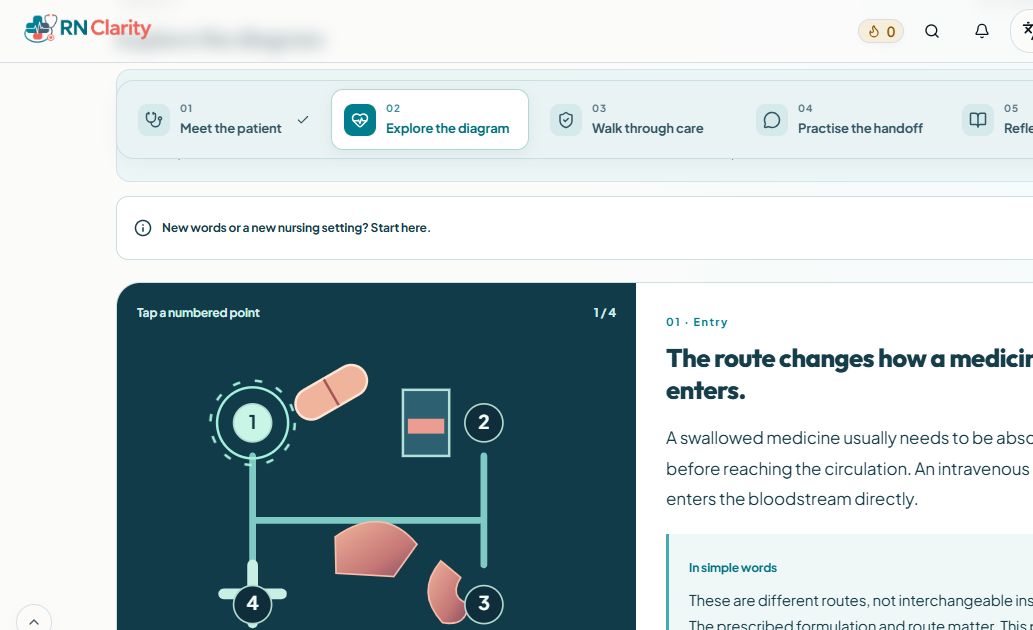
Meet a fictional patient, tap the diagram, walk through care, practise a handoff and reflect. Each lesson includes a how-to demo and plain-language help.
Tap a numbered point to connect the mechanism with the bedside observation.
Choose slide-by-slide learning or a visual overview inside each Floor Ready module. Use accompanying explanations and sources for context.
Use the infographic to recap a lesson after working through the explanation.
Explore 25 scenarios in each of 20 departments, with situations, RN actions, reasons, handoff examples and sources. Use Previous and Next to move through a department.
Open a ward scenario and explain the change that needs escalation.
Search 400 workplace words and phrases with plain meanings, pronunciation and fictional conversations with audio.
Listen to a handoff phrase and rehearse it in your own words.
Explore country-specific registration, documents, costs, study planning and workplace-role guidance. Coverage varies by country; cited regulators govern registration.
Separate where you studied from the regulator you are applying to.
Organise on-device shift reminders with private aliases, Now/Next/Later priorities, Break Mode and an end-of-shift memory sweep.
Use an alias and a task reminder without entering patient identifiers.
Practise pump and gravity calculations with supplied values, a worked method and a visual timeline. It does not prescribe or validate patient treatment.
Use the tubing’s stated drop factor in a worked gravity-flow example.
Work through supplied tablet or liquid calculations, unit conversions, explicit rounding, guided demos and practice examples.
Compare prescribed dose with the strength and quantity on the example label.
Use structured prompts to identify cues, explain choices and turn an error into a specific learning task.
Write the cue you missed and what you will look for next time.
Build a plan around your exam timing, available study days and areas needing attention. This public tool is separate from saved dashboard planning.
Create a practical plan for the time you have available.
Explore five synthetic educational rhythm strips with explanations and assessment priorities. These are not patient recordings.
Describe the strip, then compare with the explanation.
Review two quick concept cards using a reveal-and-reflect format across nursing subjects.
Try to explain a concept before revealing the card.
Build a small daily practice habit with a question and its explanation. Personal recorded activity requires the relevant account access.
Review why your chosen option fits the scenario.
Use short nursing review activities such as Drug Match and Lab Check as a study warm-up.
Begin a session with a short recall activity.
Explore common tests, illustrative US/SI ranges and clinical context. In practice, use the reporting laboratory’s interval and escalation policy.
Check the units before comparing a result with an interval.
Look up clinical shorthand with its meaning and context. A glossary does not make unsafe medication notation acceptable.
Clarify an unfamiliar abbreviation before interpreting a handoff.
Read structured nursing study guides with explanations, tables, diagrams and source links where available.
Use a guide to review assessment or medication-safety concepts.
Find organised guidance on registration, the test plan, study methods, clinical judgment and exam-day preparation.
Check how clinical judgment connects to the exam framework.
Read focused articles on exam changes, study strategies and nursing learning, with dated information and sources where provided.
Read the fee-increase explainer before planning your registration budget.
Browse digital bedside books, focused editions, samples and purchase terms. Book purchases are separate from app membership.
Read a sample before choosing a book or package.
See which interface, public introductions and supporting lesson texts have partial translations. Some language-specific resources have their own searchable URLs.
Check the coverage notice rather than assuming every question is translated.
Share supported public resources, inspect membership plans and read FAQs or contact the team. Printable exports appear only where offered.
Send a free lesson link to a classmate, then compare plans when ready.
03 · For teaching and discussion
Use the free public material for discussion, explanation and structured teaching, then inspect the student experience for yourself.
Public educator resources need no paid membership. Student dashboards remain individual learning accounts; this is not a cohort-gradebook or LMS product.
Three unfolding adult cases with cue reveals, six-function learner prompts, worked facilitator keys and debrief questions.
Separate observed cues from assumptions and missing information.
Two four-patient rounds, a changing-priority reveal and worked SBAR/check-back examples. Teach the reason behind “who first?”.
Rank patients using current cues and baseline, rather than the diagnosis label alone.
Three interactive scoring demonstrations, learner calculations and worked keys for +/−, 0/1 and a linked-pair rationale rule.
Calculate a plus/minus item score with a floor of zero.
A worked error analysis, seven-day transfer check, weekly check-in and printable plan builder. Replace “do more questions” with a specific next action.
Identify a missed cue, concept gap, priority error or option-selection error using evidence.
A realistic 30-, 45- or 60-minute teaching sequence, custom agenda builder, learner role card and assessment/exit-ticket prompts.
Write one observable objective tied to a decision or explanation.
A facilitator opening script, role cards, observation grid, worked debrief and a learning-to-workplace reflection sheet.
State the simulation’s objective, roles and safety boundaries before it begins.
Use the kit’s learner prompts, worked reasoning, agendas and debrief material. Printable and editable files are offered where shown in the kit.
Let learners explain their reasoning before opening the worked key.
Turn on optional educator prompts in a Floor Ready bedside lesson. The how-to demo explains the controls and offers ways to use the stations together.
Pause at a patient change and invite learners to explain what they would reassess.
Use the risk-scenario departments, action explanations, handoff wording and citations to explore nursing decisions with a group.
Compare why the next action changes between two ward situations.
Inspect an actual practice explanation and a complete case before recommending the platform. Public demos do not create a class performance record.
Ask learners to defend an option before revealing the rationale.
Connect presentations, infographics, nursing guides, calculation examples and pronunciation conversations with your teaching goals.
Pair a visual explanation with a fictional handoff conversation.
Educators can use an individual student account to inspect the learning experience under that account’s plan. Institution discounts are a separate program.
Watch the tour, try public examples and review access before recommending a plan.
04 · For approved referral partners
Apply to partner with RN Clarity, share approved referral tools and understand recorded results and payment status.
A free account can apply. Referral tools require approval; commission eligibility, refund holds and payout requirements apply.
Submit your audience and profile details, then return to your dashboard to see the application status. Sign-in does not automatically approve an application.
Add the channels where you reach nursing learners.
Update the available partner profile information from your private dashboard.
Keep the name and website used in your recommendation current.
Copy and open your assigned link after approval. Attribution depends on the program rules, browser storage and recorded purchases.
Include your link with an honest recommendation and disclosure.
See available promo codes, student discounts and commission terms by plan. Monthly referrals do not include the fixed-term student discount.
Read the displayed plan terms before sharing its code.
Copy a short introduction that includes the affiliate disclosure, then adapt it to your audience.
Explain why a public example may help your audience evaluate the app.
Review recorded link clicks, signups, attributed paid buyers and commission statuses. A click or signup alone is not a commission.
Distinguish a purchase in its refund window from a payable commission.
Filter commission records by status and download the filtered records for your own reconciliation.
Export the records currently marked ready to pay.
Review the supported Stripe bank-setup flow, verification needs, minimum balance and displayed payment schedule. Country availability can differ.
Complete the supported payout setup before expecting a bank payment.
Check available settlement-currency balances and distinguish transferred funds from a completed bank payout. Refunds and disputes can reverse commissions.
Use the displayed status to check whether a payment is still bank-pending.
Find attribution and commission explanations, dashboard help and a route for questions about a recorded payment.
Include the relevant record when asking about a commission.
05 · For your institution community
Register once, complete your professional profile and give eligible members a straightforward way to save.
The standard program provides a discount code, not automatic free faculty seats, student assessment access or a learning-management system. Separate pilot arrangements require confirmation with RN Clarity.
Register your institution with an authorised professional mailbox. Personal and temporary email providers are not accepted.
Use an institution-managed contact address for partnership administration.
Verify the primary professional email once and use the emailed dashboard sign-in link. A second verification is not required to unlock the code.
Request a new secure link when you need to return to the dashboard.
Provide the required representative, institution type, secondary professional email, two phone numbers and location details before a code is issued.
Select the country and state or province, then complete the remaining address fields.
The dashboard explains the secondary reference email and possible calls to both institution numbers. A secondary-email reply is not a second code-unlock requirement.
Check the recorded reference-email status and retry where offered.
Generate and copy the institution code after the required setup. It applies to eligible paid plans under the displayed terms; discounts cannot be combined.
Students enter the code and check the reduced total before paying.
Copy a pricing link that carries the institution’s code. Students may use their own personal email for their learner account.
Send the link with clear plan and renewal information.
Review confirmed purchases through the code and search the listed members. Merely browsing the link does not count as a purchase.
Check confirmed participation without accessing a student’s answers or scores.
Update the saved institution profile and contact the team for partnership questions. Student activity and scores stay private.
Ask about a separate pilot if you want to evaluate the student experience.
Share the educator kits, bedside lessons and nursing resources with faculty and students. These are available regardless of paid student purchases.
Explore a teaching kit before recommending any membership.
A FEW CLEAR ANSWERS
Yes. Public tools, teaching resources, guides, bedside lessons and demonstrations are free to explore. A free account offers selected study previews. Full practice collections and personal features follow the current plan limits.
The institution discount dashboard shows confirmed code uses and listed members. It does not provide access to private learning activity or scores. The standard program is a discount partnership, not a cohort gradebook.
No. Digital books are separate purchases. Read their samples and purchase terms in the RN Clarity Bookstore.
No. Language support is partial; assessment questions and choices remain English. Installing the web app does not make all study content available offline.
No. Scores and adaptive practice support learning rather than predicting NCLEX results. Floor Ready is educational support; registration, supervised orientation and local clinical policy govern practice.
START WITH ONE USEFUL STEP
Feature guide checked October 11, 2026. Current access, allowances and billing terms are shown on Pricing and in the relevant workspace.
Sources, corrections & educational scope →